Article
Read the full piece
You found the perfect job.
You carefully read the job description.
You believe you meet the requirements.
You submit your CV.
Then you wait.
And wait.
No interview.
No rejection email.
No explanation.
So, what happened?
One possibility is that your application went through an Applicant Tracking System (ATS) before reaching a recruiter.
For today's job seeker, understanding ATS is no longer just a technical topic.
It is part of understanding how modern recruitment works.
If your CV is not structured and written effectively, your qualifications may be harder for recruitment technology to identify.
And that can affect your visibility in a competitive hiring process.
What Is an Applicant Tracking System?
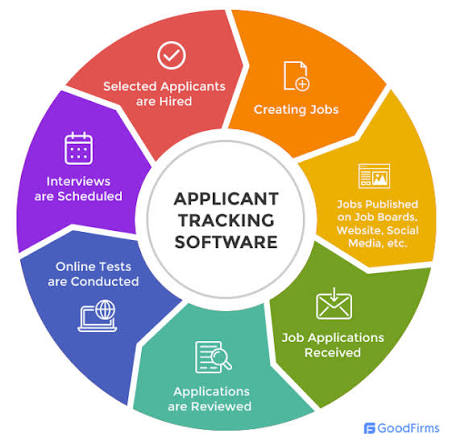
An Applicant Tracking System (ATS) is software organizations use to help manage recruitment and job applications.
Instead of recruiters manually organizing every application from beginning to end, an ATS can help employers:
collect applications
organize candidate information
search applications
identify relevant qualifications
manage candidate records
track recruitment stages
support communication
coordinate hiring workflows
For employers receiving large numbers of applications, technology can make recruitment administration more manageable.
For job seekers, however, it creates a new challenge:
Your CV needs to communicate effectively in a technology-assisted recruitment environment.
Why Do Employers Use ATS?
Imagine a company advertises one position and receives hundreds of applications.
A recruiter cannot realistically spend the same amount of time reading every CV in detail.
An ATS can help organize that large volume of applications and make relevant candidate information easier to identify.
Employers may use recruitment systems to help them manage:
1. Application collection
Candidates submit their applications through an online recruitment platform.
2. Candidate organization
Applications and candidate information can be stored and organized systematically.
3. Search and filtering
Recruiters can search candidate information using relevant criteria and terminology.
4. Recruitment workflow
Organizations can track candidates through different stages of the hiring process.
5. Communication
Recruitment teams may use systems to support communication and scheduling.
The exact capabilities vary depending on the ATS and how an employer has configured it.
Does an ATS Automatically Reject Your CV?
This is one of the biggest misconceptions about ATS.
People often say:
“The ATS rejected my CV.”
But recruitment systems differ significantly in how they are configured and used.
Some systems may support automated screening or ranking. Others may primarily help employers collect, organize and search applications.
Therefore, you should not think of ATS as a single universal robot that makes every hiring decision.
Instead, think of it as part of a technology-supported recruitment process.
The important lesson is this:
Make your CV clear, relevant, searchable and easy to process.
What Happens When You Submit an ATS-Friendly CV?
When you submit a CV through a recruitment platform, the system may process information such as:
your name
contact details
employment history
job titles
education
skills
certifications
professional experience
other information included in your application
Depending on the system, your information may then become searchable or available to recruiters through the hiring workflow.
This is why the way you structure your CV matters.
If important information is buried inside complicated formatting, the system or recruiter may have more difficulty interpreting it.
Why Keywords Matter
Job descriptions contain clues about what an employer considers important.
Suppose a position requires:
project management
stakeholder engagement
monitoring and evaluation
data analysis
reporting
If you genuinely possess these skills, your CV should communicate them clearly.
Instead of writing:
Experienced professional with strong organizational skills.
You could write:
Project professional with experience in project coordination, stakeholder engagement, monitoring and evaluation, data analysis and reporting.
The second version is more specific.
It tells the employer what you actually know and what areas of work you have experience in.
Keywords should never be added simply to manipulate a system.
Use terminology that accurately reflects your qualifications and experience.
Don't Copy the Job Description
Another common mistake is copying the entire job description into your CV.
This is not effective CV writing.
Your goal is to identify the requirements that genuinely match your background and demonstrate them through your:
professional summary
skills
employment history
achievements
education
certifications
projects
For example, if the employer asks for budget management, don't simply repeat “budget management.”
Show how you have actually used the skill.
For example:
Supported budget preparation, expenditure tracking and financial reporting for departmental activities.
That provides context and evidence.
Your Job Title Matters
Job titles can help recruiters understand your professional background quickly.
Compare:
Administrative Assistant
with:
Office Person
The first communicates a recognizable professional function.
However, never change your official job title simply to match a vacancy if doing so would misrepresent your experience.
If your actual title is unusual but your responsibilities are relevant, you can clarify the function through your achievement and responsibility descriptions.
Optimize for clarity without misrepresenting your career history.
Use Standard CV Headings
An ATS-friendly CV does not need complicated section names.
Consider standard headings such as:
Professional Summary
Professional Experience
Education
Skills
Certifications
Professional Affiliations
Leadership Experience
Achievements
These headings make your CV easier to navigate for both technology and human readers.
Keep Your CV Easy to Read
A strong ATS CV should also be easy for a recruiter to scan.
Avoid making the document unnecessarily complicated.
Be careful with:
excessive graphics
overly decorative layouts
complicated tables
unusual fonts
excessive columns
important information embedded in images
inconsistent formatting
The exact compatibility of a design depends on the specific ATS, but a simple, clearly structured CV generally reduces unnecessary processing and readability problems.
Your CV should communicate—not confuse.
ATS-Friendly Does Not Mean Boring
Some candidates hear “ATS-friendly” and imagine a plain document with no personality.
That is not the goal.
You can still create a professional and attractive CV.
Focus on:
clean formatting
strong section hierarchy
professional typography
consistent spacing
concise achievement statements
relevant keywords
logical organization
The design should support your professional story.
Don't let design overpower substance.
Achievements Make Your CV Stronger
ATS optimization is not only about keywords.
Your CV still needs to convince a human recruiter.
Compare:
Responsible for preparing reports.
with:
Prepared 20+ monthly operational reports to support management decision-making and improve reporting efficiency.
The second statement provides more context and demonstrates contribution.
Where possible, quantify genuine achievements using:
percentages
numbers
financial values
team sizes
project numbers
time savings
customer volumes
growth figures
Numbers can make your contribution easier to understand.
Tailor Your CV for Every Important Application
One of the most effective ATS strategies is also one of the simplest:
Tailor your CV.
Do not automatically send the same document to every employer.
Start by identifying:
What does the employer need?
Then ask:
Which of my qualifications demonstrate that I can meet this need?
Then adjust your CV accordingly.
For example:
A finance position may require emphasis on:
financial reporting
reconciliation
taxation
budgeting
compliance
A monitoring and evaluation position may require emphasis on:
data collection
indicators
performance measurement
reporting
research
Your career history may remain the same, but the most relevant evidence should be brought forward.
ATS Is Only One Part of Recruitment
A common mistake is becoming so focused on ATS that candidates forget the real objective.
The objective is not:
“Pass the ATS.”
The objective is:
“Secure an opportunity to demonstrate that I am qualified.”
That means your CV needs to work at several levels.
Level 1: Compatibility
The document should be structured clearly.
Level 2: Relevance
The content should align with the position.
Level 3: Evidence
Your experience should demonstrate what you can actually do.
Level 4: Persuasion
The recruiter should understand your value.
Level 5: Accuracy
Everything should be truthful.
A CV that focuses only on keywords but lacks substance will not create a strong application.
Common ATS Mistakes Job Seekers Make
Avoid these mistakes:
1. Using one CV for every job
Different positions have different priorities.
2. Adding irrelevant keywords
More keywords do not automatically mean a stronger CV.
3. Claiming skills you don't have
Never compromise your professional integrity.
4. Using overly complicated designs
Complex formatting can make information harder to process or read.
5. Listing responsibilities without achievements
Show what you contributed.
6. Writing a generic professional summary
Make your professional identity relevant to the role.
7. Ignoring the job description
The vacancy tells you what the employer needs.
8. Submitting without checking
Review your CV before every important application.
How to Build an ATS-Friendly CV
Use this simple process:
STEP 1: Find the right opportunity
Identify positions that genuinely match your background.
STEP 2: Study the job description
Identify qualifications, skills and responsibilities.
STEP 3: Compare your experience
Determine which requirements you genuinely meet.
STEP 4: Tailor your CV
Bring the most relevant experience forward.
STEP 5: Use appropriate keywords
Include relevant terminology naturally.
STEP 6: Strengthen your achievements
Show results, contribution and impact.
STEP 7: Simplify the structure
Use clear headings and professional formatting.
STEP 8: Proofread
Check spelling, grammar, dates and consistency.
STEP 9: Test your CV
Evaluate its ATS compatibility and relevance before submitting.
STEP 10: Apply strategically
Submit a strong, tailored application rather than simply submitting more applications.
Don't Let Your CV Become Invisible
You may have an impressive degree.
You may have years of experience.
You may possess valuable technical skills.
You may have achieved remarkable results.
But employers can only evaluate what your application communicates.
That is why your CV needs to make your strongest qualifications visible, relevant and understandable.
ATS awareness is not about gaming recruitment.
It is about adapting to how modern recruitment works.
The Smart Job Seeker Checks Before Applying
One of the biggest mistakes candidates make is assuming their CV is perfect simply because it looks professional.
A CV can look good and still have:
weak keyword alignment
missing skills
unclear achievements
poor structure
irrelevant content
weak professional positioning
Before submitting your application, take time to evaluate it.
Smart CV Checker can help you review your CV and identify areas where it may need improvement.
Instead of submitting your CV and hoping for the best, check it before you apply.
Final Thoughts: Understand the System, Improve Your Strategy
Applicant Tracking Systems are now part of the modern recruitment environment.
You don't need to fear them.
You don't need to manipulate them.
And you certainly don't need to become someone you are not.
You need to understand how recruitment technology works and make sure your CV communicates your real qualifications clearly.
Remember:
Relevant CV > Generic CV
Clear CV > Complicated CV
Evidence > Empty claims
Achievements > Responsibilities alone
Tailored application > One-size-fits-all application
Truthful optimization > Keyword stuffing
Your CV is more than a document.
It is your professional introduction.
Make sure it introduces you in the strongest, clearest and most relevant way possible.
Before You Submit Your Next Application
Don't guess whether your CV is ready.
Check it. Improve it. Tailor it. Then apply with confidence.
Use Smart CV Checker to evaluate your CV and make your next job application stronger.
Your next interview may start with the improvements you make to your CV today.
More from the journal
Related reading
How ATS Systems Read Your CV: What Happens After You Click “Submit”?
ATS vs Traditional CVs: What Modern Employers Really Want